
Most competitor ads can be researched free of charge from the platforms’ public ad libraries, the Meta Ad Library, Google Ads Transparency Center, and LinkedIn Ad Library. Paid ad-intelligence tools include spend estimates, multi-year history, ad run-length and alerts, and they’re only worth the price if you’re looking for competitors weekly or multiple at once.
Always use your own information first, before purchasing third-party subscriptions. When running search campaigns, check the free Auction Insights report in Google Ads to understand who is bidding in the auctions you’re bidding on. When native auction data is not enough to show creative formats and cross-channel positioning, turn to external tools.
At Adchievers, we manage performance campaigns across the UAE and Lebanon. We hold no affiliate stake in any paid monitoring software, nor do we sell software licenses. This evaluation reflects how our media buyers actually conduct competitive research for regional service and retail brands without wasting budget on unnecessary SaaS subscriptions.
The short answer – start free, pay only when you outgrow it
Start your competitive research with free ad libraries, and pay for third-party intelligence databases only after you exceed their manual tracking capacity. For roughly 80% of small and mid-sized businesses in regional markets like Dubai and Beirut, the free libraries provide every creative asset and active messaging angle needed to build a counter-strategy.
Only when you need to see the duration of the paid tools (also known as ad-spy databases), time-history data, or automated competitive alerts for dozens of accounts do you need the paid tools. Purchasing a $200 monthly paid traffic tool when your working media budget is less than $5,000 (about 18,350 AED) per month is a waste of working media budget. Exhaust the native transparency databases first.
The free tools, and exactly what each one shows
Free ad libraries are public transparency archives maintained directly by major advertising platforms to comply with global regulatory frameworks. Because these tools index ad accounts natively, they reflect live, active creative distributions without scraping delays.
To conduct accurate research, you must understand how to isolate regional targeting inside each specific platform interface.
Meta Ad Library
Meta Ad Library displays all active ads on Facebook, Instagram, Messenger, and Audience Network. Filter it by choosing the country you want the ad to be shown in (like the United Arab Emirates or Lebanon) and the type of ad (that is, “All Ads” and typing the competitor brand name or domain into the search bar). Its limit is the complete absence of historical performance metrics, ad spend figures, audience targeting parameters, and inactive ad archives for commercial brands.
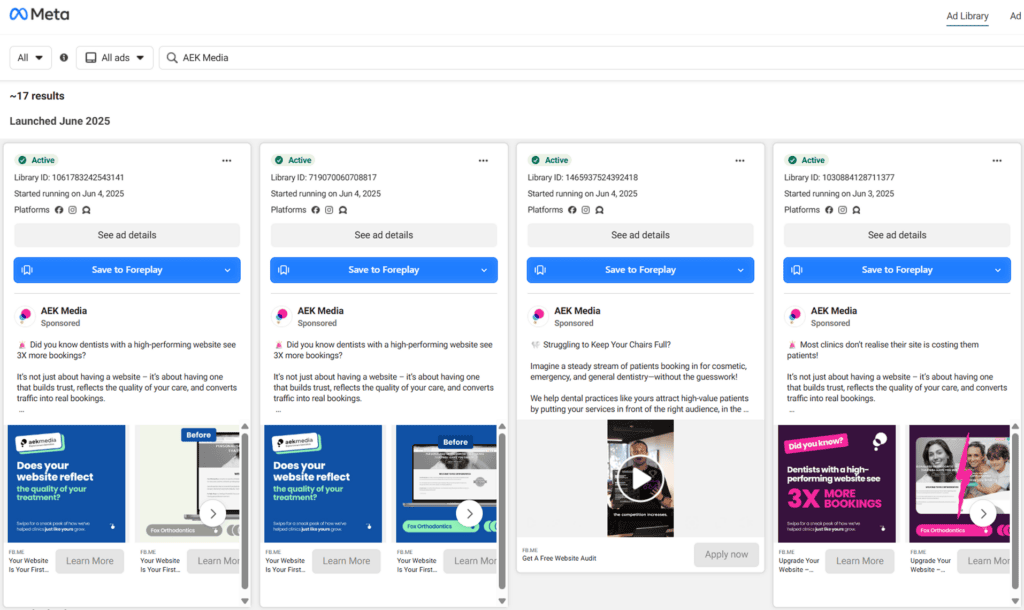
Use the filter to narrow down the results by country, and then choose “All Ads” to show you just the active competitor creatives in regional markets such as the UAE.
Google Ads Transparency Center
Google Ads Transparency Center displays all ads served by verified advertisers for search, display, shopping and YouTube video ads on Google’s networks. Search it by using the legal business name of the competitor, or the URL of the website, choose the country from the geographic dropdown and filter it by date range or format. The drawback is that it shows ads from only those who are already verified as an advertiser by Google, and excludes unverified accounts and the number of impressions, bids, and keywords.
LinkedIn Ad Library
On LinkedIn Ad Library, you’ll see all LinkedIn Sponsored Content, LinkedIn Message ads, and LinkedIn Dynamic ads that any company page serves in the last six months. Then filter it by searching the exact name of the company that you’re interested in and checking the active ad feed that gets auto-filled on their public profile repository. The restriction is that it does not have the filtering controls at the ad unit level, so you are not able to see if an ad targeted specifically to professionals in Dubai, Riyadh, or London was shown.
TikTok Creative Center
TikTok Creative Center displays the most successful public auction ads, popular audio, and patterns for creatives on TikTok. You can do this by going to the Top Ads Dashboard and selecting the country in the country filter dropdown, and then sorting by industry category or objectives. The drawback of this is that it will only bring up ads that are performing well, and not an endless list of all of the ads in a particular competitor account.
What paid ad-intelligence tools add that free ones can’t
Paid ad-intelligence tools aggregate public ad placements into searchable, historical databases, adding operational layers that platform libraries intentionally suppress. Where free libraries operate as passive directories, paid platforms function as analytical search engines.
The primary capabilities paid tools introduce include:
- Spend and impression estimates: Paid platforms apply proprietary algorithmic modeling to estimate a competitor’s daily and monthly media spend in USD or AED. These models are not 100% accurate, when compared to actual receipts for billing, but provide a relative scale.
- Run length and longevity tracking: These track the exact date that an ad was first seen or last seen. Longevity is the best indicator of ad performance – if you have an advertiser who has spent months on the same creative variation, then that ad is performing profitable.
- Multi-year historical archives: Free libraries remove commercial advertisements as soon as they cease to be displayed if they are not political. Inactive creatives are stored in paid tools forever and can be viewed by analyzing past holiday promotions, like past Ramadan or Black Friday campaigns.
- Boolean search of ad copy: On paid platforms, you can search both across landing page content and ad headlines and across transcripts and find all of those that are targeting a specific positioning angle.
- Automated competitor alerts: Paid tools send alerts when a competitor’s ad concept appears in four different repositories instead of having to visit all four each week to find it.
Examples of such commercial databases include Semrush, Spyfu, and Adespresso. But third-party tools are only half the solution for looking at top-line metrics. If your objective is to check a competitor’s Google Ads budget, automated estimates must always be verified against regional benchmark CPCs rather than accepted as ground truth.
Free vs paid, side by side
The table below outlines the core functional differences between public platform libraries and commercial intelligence software.
| Capability | Free ad libraries | Paid ad-intelligence tools |
| Direct creative access | Yes (real-time active ads) | Yes (active and historical archives) |
| Cost to access | $0 (publicly available) | $50 to $500+ per month |
| Regional country filtering | Native by platform (UAE, LB, etc.) | Available on higher-tier plans |
| Estimated ad spend | Not provided | Algorithmic approximations |
| Ad longevity (run-length) | Only shows currently active state | Explicit first-seen and last-seen timestamps |
| Historical inactive ads | Deleted when paused | Stored permanently in archive |
| Automated new-ad alerts | No (manual checks required) | Yes (email and dashboard notifications) |
| Cross-platform search | Manual (visit each tool individually) | Unified single-dashboard search |
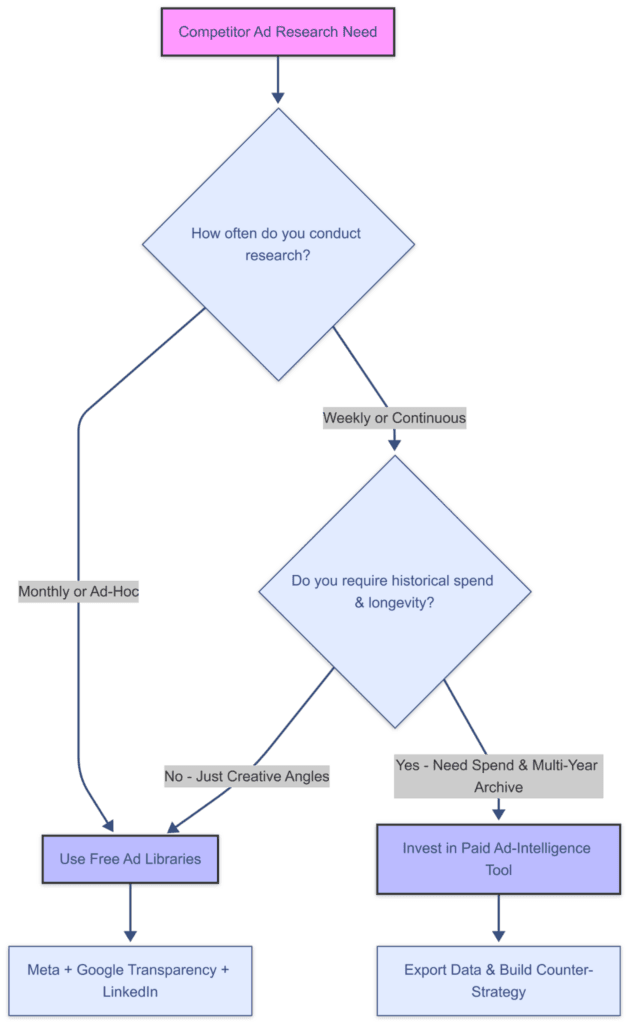
The decision path for choosing between free native ad libraries and paid ad-intelligence tools.
When it’s worth paying – the upgrade triggers
You should purchase a paid ad-intelligence tool only when your operational losses from manual research exceed the cash cost of the subscription.
At Adchievers, we move client accounts to paid intelligence monitoring only when they cross these specific triggers:
- Trigger 1: You manage more than five direct competitors across multiple networks. Visiting ad libraries on Meta, Google, and LinkedIn manually can take over 3 hours per week, but automation can save the time of staff members.
- Trigger 2: You go into a tough vertical with lots of creative iteration. In other business segments such as regional real estate, e-commerce or financial services in Dubai, dozens of hooks are tested each week. A paid tool isolates their winning, long-running ads immediately.
- Trigger 3: You need historical seasonal archives. If you plan a Q4 holiday or Ramadan promotion in August, free libraries will show you zero seasonal creative because those campaigns are currently paused. To view past competitors’ runs, you will need a multi-year archive.
- Trigger 4: The media spending is above $10,000 per month (about 36,700 AED per month). When you’re on this level, software overhead is more than justified by an increase in efficiency when you learn how to research competitor hooks, offers, and landing pages.
If you do not meet at least two of these criteria, stay with the free libraries. If you need a comprehensive, fully managed competitive teardown without taking on ongoing software subscriptions, you can have our team research competitor Google Ads directly for your brand.
Are competitor-ad tools legal and ethical?
Competitor-ad research tools are legal and ethical when used to inspect public marketing materials. The free tools discussed are first-party transparency products built directly by Meta, Google, and LinkedIn to meet government transparency mandates and foster consumer trust.
Third-party paid tools collect data from these public interfaces and compile it into indexable databases. Viewing an ad that a competitor intentionally published to the public search engine results page or social feed violates no privacy policies or intellectual property rights.
The ethical line is the responsibility of the researcher and depends on the use of the research. Researching a competitor’s message angle, headline wording, visuals and promotional offering to look for gaps in the market is fair competitive intelligence. The direct copying of their ad copy, downloading their brand assets, and copying their trademarked brand are all forms of copyright infringement. Utilize these tools to determine market saturation, and create unique messaging that emphasizes what makes you special.
FAQ‘s
How do I see competitor ads for free?
Leverage the platform’s own public ad libraries, Meta Ad Library, Google Ads Transparency Center and LinkedIn Ad Library.
What do paid tools add?
Spend estimates, multi-year history, ad run-length, Boolean search, and automated alerts, the parts the free libraries hide.
When should I pay?
When you research competitors weekly, you need to spend estimates or history, or monitor many competitors at once.
Are these tools legal?
Yes, the ad libraries are public transparency products; viewing competitor ads is legitimate research.
What is the best tool overall?
For most regional SMBs the free libraries answer roughly 80% of the question; pay only past the upgrade triggers.